SECTION 4:
Member And Their Envelopes
[Alt]+[E] - Members and their Envelopes
The Members and their Envelopes Screen will be shown first to allow the user to
select a contributor.
Use the cursor keys to move to the desired member, press the [Enter] key to select the member.
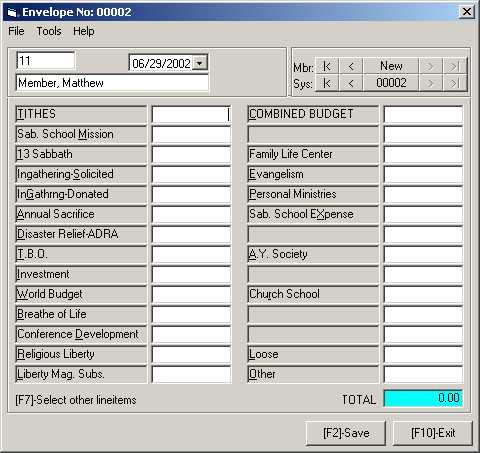
An Envelope screen similar to the below will be shown

Using the cursor keys, move to the desired line item. Enter the amount for the line item and press the [Enter] key. Repeat the process until all the line items on the envelopes are entered on the screen. After entering all the line items, press the [F2] to save the data or press [F10] to exit the screen without saving the data. In either case, you will be taken back to the Member Selection Screen to selection a new member or to return to the System Main Menu Screen.
Using Jump Key
To
move directly to a line item, press the key matching the highlighted letter in the line item description. Enter the amount for the line item and press the highlighted letter of the next line item to be entered. Continue this until all amounts and entered and then press [F2] to save the envelope.
Entering Line Items not shown on the Screen
Move to the last line on the screen, normally the Other line item, to any blank line on the screen, or to any line items not required for this particular envelope to enter a line item not shown on the screen. It is best to use the last item for quicker identification of additional items. Press the [F7] key
to pop up a list of all line items in the system. Use the cursor and paging keys to move to the desired line item and press the [Enter] key to select the line item. It will now be displayed on the screen. Enter the amount and move to the next line item to be entered.
Reviewing Previous Envelopes
You can also view previous envelopes for a member by pressing the [Ctrl]+[PgUp] key. Continuous pressing of this key will show earlier entries
for the member until the first entry is show. The [Ctrl]+[PgDn] can be used to scroll in the forward direction showing later entries until a blank screen is shown for entering a new envelope.
You can also view previous envelopes in the system for all members by pressing the
[Alt]+[PgUp] key. Continuous pressing of this key will show earlier entries until the first entry is show. The
[Atl]+[PgDn] can be used to scroll in the forward direction showing later entries until a blank screen is shown for entering a new envelope.
Locating a Member
Locating a particular member in the system can be accomplished in several ways.
At the Search: prompt, to select a contributor named Carmen Maria Wright, the user can use either of the following styles:
As many members matching the specifier in the above entry will be shown on the screen in its lower half. The system pointer is positioned at the first member in the list and shows additional information on the member in the upper portion of the screen.